NVIDIA RTX PRO Desktop GPU Architectures & Models: Blackwell vs Ada vs Ampere vs Turing
Maximize performance with NVIDIA RTX PRO and build a desktop workstation that stays fast, stable, and certified under real professional workloads. NVIDIA RTX PRO™ Desktop GPUs are designed for AI, graphics, rendering, simulation, and scientific computing—where large datasets, complex geometry, and strict reliability requirements are non-negotiable. With enterprise drivers, extensive ISV certifications (over 100 professional applications), and enterprise-grade manageability, RTX PRO helps teams turn ambitious ideas into deliverables faster and with fewer workflow disruptions.
Why NVIDIA RTX PRO Is Built for Professional Workflows
Consumer GPUs can be powerful, but professional environments often demand more than raw performance. NVIDIA RTX PRO solutions are engineered for predictable behavior across critical applications and long deployment cycles. That matters whether you’re supporting a design department, a VFX studio, a simulation group, or an enterprise AI team.
Key benefits that set RTX PRO apart
- ISV certifications: Certified for leading professional software to deliver a smooth, stable experience in CAD, DCC, animation, simulation, rendering, and more.
- Enterprise drivers: Continually tuned and tested for compatibility and stability—helping reduce crashes, glitches, and unexpected performance issues.
- Simplified manageability: Easier deployment and lifecycle planning, plus robust tools for multi-display modes and IT management.
- Enterprise software ecosystem: Access to NVIDIA NGC, NVIDIA AI Workbench, NVIDIA AI Enterprise (for AI development) and NVIDIA Omniverse Enterprise (for industrial digitalization and simulation workflows).
NVIDIA RTX PRO Architectures: What’s New and Why It Matters
NVIDIA RTX PRO spans multiple generations. Choosing the right workstation GPU means matching the architecture’s strengths to your workload (AI training/inference, real-time rendering, CAD, video, simulation, etc.). Below is an architecture-by-architecture overview using the provided model tables.
NVIDIA Blackwell Architecture (RTX PRO Desktop GPUs)
The NVIDIA Blackwell Architecture is positioned as the engine for professional AI workflows, combining major AI and graphics advancements with large, fast GDDR7 memory options.
Blackwell highlights for professionals
- Fifth-Gen Tensor Cores: Max AI performance with FP4 and DLSS 4.
- New Streaming Multiprocessors: AI-powered graphics with neural shaders.
- Fourth-Gen Ray Tracing Cores: Built for mega geometry—ideal for heavy scenes and complex models.
- Larger, faster GDDR7 memory: Up to 96GB for complex projects and datasets.
- Latest NVENC/NVDEC: Up to 4 encode/decode engines with 4:2:2 support.
Blackwell RTX PRO models
Blackwell introduces a strong lineup covering ultra-high memory workstations down to compact, efficient options.
- RTX PRO 6000 Workstation Edition: 96GB GDDR7 ECC, 4x DisplayPort 2.1, up to 600W (dual slot).
- RTX PRO 6000 Max-Q: 96GB GDDR7 ECC, 4x DisplayPort 2.1, up to 300W (dual slot).
- RTX PRO 5000: 48GB GDDR7 ECC, 4x DisplayPort 2.1, up to 300W.
- RTX PRO 4500: 32GB GDDR7 ECC, 4x DisplayPort 2.1, up to 200W.
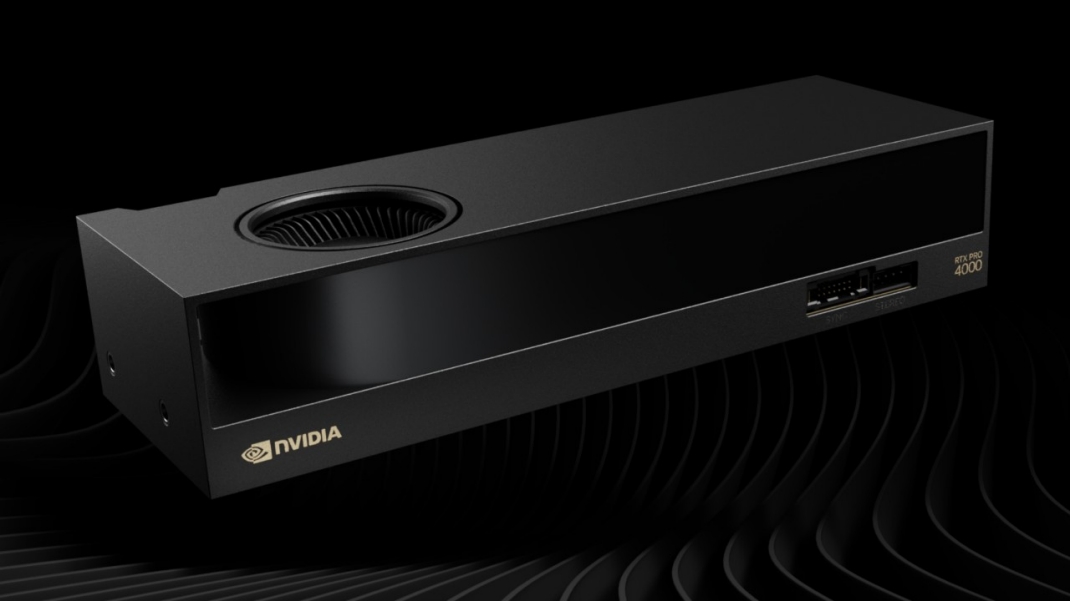
- RTX PRO 4000: 24GB GDDR7 ECC, 4x DisplayPort 2.1, up to 140W (single slot).
- RTX PRO 4000 SFF (New): 24GB GDDR7 ECC, 4x Mini DisplayPort 2.1, up to 70W (compact).
- RTX PRO 2000 (New): 16GB GDDR7 ECC, 4x Mini DisplayPort 2.1, up to 70W (compact).
NVIDIA Ada Lovelace Architecture (RTX 6000/5000/4500/4000 Series)
Ada Lovelace-based RTX workstation GPUs remain a highly capable choice for many organizations—especially where proven deployment maturity, strong performance-per-watt, and a broad range of configurations are priorities.
Ada Lovelace models
- RTX 6000: 48GB GDDR6 ECC, 4x DisplayPort 1.4a, up to 300W.
- RTX 5000: 32GB GDDR6 ECC, 4x DisplayPort 1.4a, up to 250W.
- RTX 4500: 24GB GDDR6 ECC, 4x DisplayPort 1.4a, up to 210W.
- RTX 4000: 20GB GDDR6 ECC, 4x DisplayPort 1.4a, up to 130W (single slot).
- RTX 4000 SFF: 20GB GDDR6 ECC, 4x Mini DisplayPort 1.4a, up to 70W.
- RTX 2000: 16GB GDDR6 ECC, 4x Mini DisplayPort 1.4a, up to 70W.
NVIDIA Ampere Architecture (RTX A-Series Workstation GPUs)
Ampere brought a broad professional lineup with options spanning heavy workstation rendering to compact, power-efficient builds. It remains widely deployed in many businesses due to excellent driver maturity and a strong balance of performance and cost.
Ampere models
- RTX A6000: 48GB GDDR6 ECC, 4x DisplayPort 1.4a, up to 300W.
- RTX A5500: 24GB GDDR6 ECC, 4x DisplayPort 1.4a, up to 230W.
- RTX A5000: 24GB GDDR6 ECC, 4x DisplayPort 1.4a, up to 230W.
- RTX A4500: 20GB GDDR6 ECC, 4x DisplayPort 1.4a, up to 200W.
- RTX A4000: 16GB GDDR6 ECC, 4x DisplayPort 1.4a, up to 140W (single slot).
- RTX A2000 (6GB/12GB): GDDR6 ECC, 4x Mini DisplayPort 1.4a, up to 70W.
- RTX A1000: 8GB GDDR6, 4x Mini DisplayPort 1.4a, up to 50W.
- RTX A400: 4GB GDDR6, 4x Mini DisplayPort 1.4a, up to 50W.
- A800 40GB Active: 40GB HBM2, not equipped with display ports, up to 240W (specialized compute-focused option).
NVIDIA Turing Architecture (T1000/T600/T400)
Turing-based workstation GPUs are commonly used for entry-level professional visualization, multi-display office workflows, and lightweight CAD. They prioritize compact form factors and low power draw.
Turing models
- T1000 (4GB/8GB): 4x Mini DisplayPort 1.4, up to 50W.
- T600: 4GB GDDR6, 4x Mini DisplayPort 1.4, up to 40W.
- T400 (2GB/4GB): 3x Mini DisplayPort 1.4, up to 30W.
How to Choose the Right NVIDIA RTX PRO Desktop GPU
Selection should be driven by workload needs, chassis constraints, display requirements, and IT support expectations. Use these practical guidelines to narrow the field.
1) Start with memory (VRAM) requirements
- 48–96GB class: Ideal for massive assemblies, high-resolution VFX scenes, large simulation datasets, and AI workloads that benefit from large GPU memory pools. Consider RTX PRO 6000 (Blackwell) or RTX 6000 (Ada), or RTX A6000 (Ampere).
- 20–32GB class: A strong fit for most CAD, rendering, and multi-app professional workflows. Examples include RTX PRO 4500 (Blackwell) or RTX 4500 (Ada) / RTX A4500 (Ampere).
- 16–24GB class: Great for compact workstations, multi-display setups, and general pro visualization. Examples include RTX PRO 4000 (Blackwell), RTX 4000 (Ada), RTX A4000 (Ampere), and RTX PRO 2000 (Blackwell).
2) Match power and form factor to your workstation
- High-power towers: Can accommodate top-end cards like the 600W RTX PRO 6000 Workstation Edition.
- Power/thermal-constrained builds: Look at Max-Q variants (e.g., RTX PRO 6000 Max-Q at 300W) or SFF options (70W class).
- Single-slot needs: Options include RTX PRO 4000 (Blackwell) and RTX 4000 (Ada) and RTX A4000 (Ampere) in single-slot form factors (per provided tables).
3) Consider display connectivity and future-proofing
If you run modern high-resolution, high-refresh displays (or multiple panels), Blackwell’s DisplayPort 2.1 (and Mini DisplayPort 2.1 on SFF models) can be a key advantage versus prior DisplayPort 1.4a generations.
4) Prioritize certified stability for production environments
For enterprises, the value of RTX PRO often comes from minimizing downtime: certified applications, validated drivers, and enterprise support. This is especially important for mission-critical deployments where a driver issue can halt a department’s productivity.
FAQ: NVIDIA RTX PRO Desktop GPUs
Are RTX PRO GPUs only for graphics professionals?
No. RTX PRO is designed for AI, simulation, rendering, engineering, and scientific computing as well as professional visualization—especially where stability, certifications, and manageability matter.
What does ECC memory mean in RTX PRO cards?
Many RTX PRO models include ECC (Error-Correcting Code) memory to help detect and correct certain memory errors, improving reliability for long-running, high-value workloads.
What’s the biggest reason to choose Blackwell-based RTX PRO?
Blackwell brings major platform upgrades for modern workflows: 96GB GDDR7 ECC options, advanced AI acceleration (FP4 via fifth-gen Tensor Cores), DisplayPort 2.1 connectivity, and updated NVENC/NVDEC capabilities.
Conclusion
NVIDIA RTX PRO Desktop GPUs deliver a professional platform built for demanding real-world work—combining high-end AI and graphics acceleration with enterprise drivers, ISV certifications, manageability tools, and long-lifecycle support. Whether you’re standardizing on the latest Blackwell models for maximum memory and next-gen features, choosing Ada Lovelace for strong, proven performance, leveraging Ampere for broad deployment value, or outfitting entry-level systems with Turing, the RTX PRO portfolio makes it easier to align GPU capability with workload needs—and keep teams productive at scale.